
Reporting is split into three sections:
|
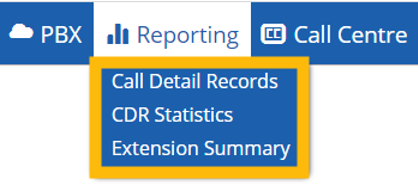 |
Call Detail Records
Call Details Records allows you to search through all the calls on the PBX using criteria such as:
- Call Direction
- Call Status
- Date Range
- Destination
- Caller Name
The Call Detail Records section is generally used to compile reports for example:
- Find all outbound calls to a specific number during the month
- Find all inbound calls to a specific user during the month
- Total missed calls to a specific number during the month
You will also have the ability to export the search results in either PDF of XLS format for further processing of your reports.
CDR Statistics
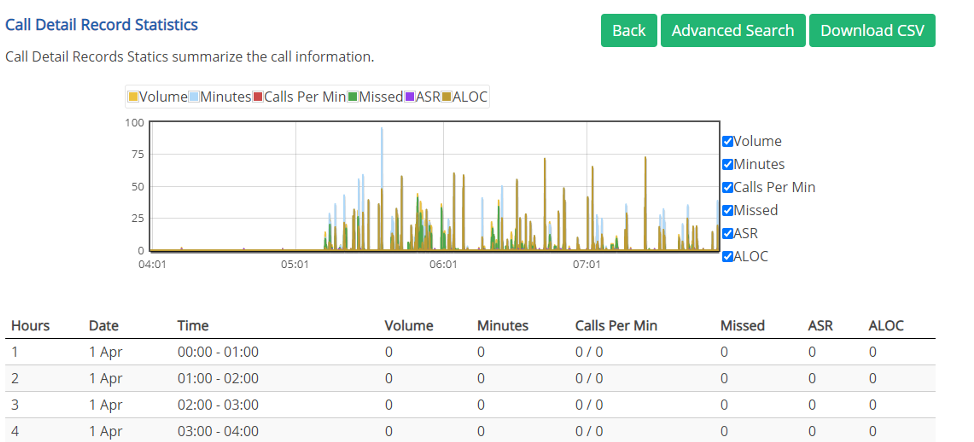
Using CDR Statistics you can build and export usable reports. The default reports will display the information below broken down by the last 24 hour period (per hour breakdown), Last 7 day summary, and the last 30 day summary. Custom reports can also be created using the advanced search and exported to CSV (Excel Format).
Fields:
- Hours (Hour of Day)
- Date (Date of Call)
- Time (Time of Call)
- Volume (Number of Calls)
- Minutes (Number of Minutes on a call)
- Call Per Min (Number of calls per minute)
- Missed (Number of missed calls)
- ASR (answer-seizure ratio, this is shown as a % of the number of calls answered)
- ALOC (average length of conversation, displayed in minutes)
Extension Summary
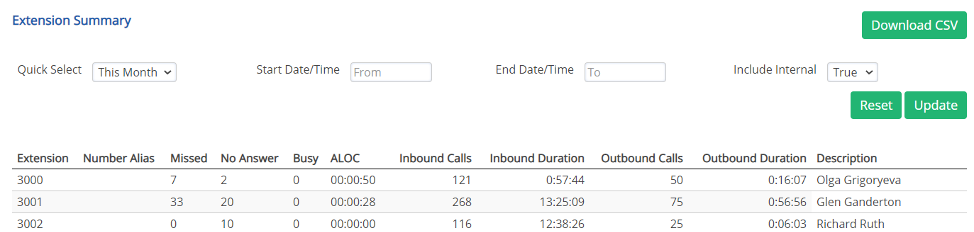
The extension summary section gives a quick breakdown of each extension. Reports can be exported to CSV.
Comments
0 comments
Please sign in to leave a comment.