
Follow Me, also referred to as "Find Me, Follow Me" is a feature of the Voiceflow phone system that can be enabled when adding Call Routing Rules. Follow Me provides more options than Call Forwarding and enables you to create a list of phone numbers that will be dialed (for a specified number of seconds) for each call to your Voiceflow phone number. This functionality provides a way for callers to reach you at any of your designated phone numbers. For example, if you might be away from the office, Follow Me will always ring your office number first, then ring your mobile phone number, and finally ring your home number. If you do not answer any of these calls, the caller will be redirected your office phone voicemail box to leave a message.
TIP 1: Remember to add your desk phone extension number as the first number if you want that to ring first.
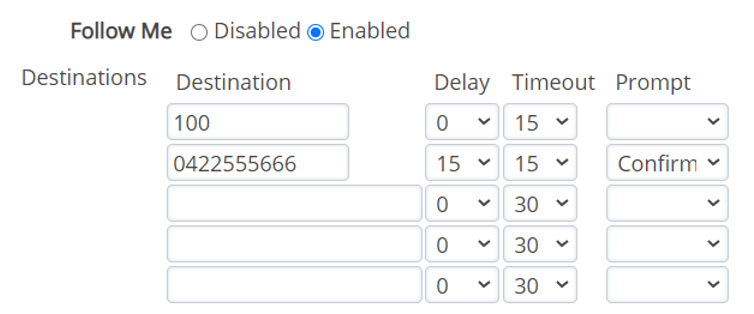
Configuring a Follow-Me Rule
- Add a destination - This could be your mobile number in most cases.
- Add a delay for the first number - If you select “0 Seconds” this means their is no delay between ringing your desk phone and the number you entered as your first destination, they would both ring at the same time. If you select a delay of 15 seconds, your desk phone would ring immediately and after 15 seconds the destination number you added would start to ring.
- Add a Time Out - This is how long the number will ring for.
- Add a Second, Third or Forth Destination Number.
- Enable the “Confirm” option - Generally only enabled for mobile phones so that the call doesn’t go to your mobile phone voicemail box. When a phone with the “Confirm” option answers the phone they will be prompted to dial 1 to accept the call, if 1 is not pressed the Follow-Me will continue to the next destination.
TIP 2: Most mobile phone carriers only allow a mobile to ring for a maximum of 30 seconds before hitting voicemail.
TIP 3: By default your extension time out limit is 30 seconds, this means the maximum "Time Out" allowed for all destinations combined is 30 seconds. If you need this to be extended please contact the Voiceflow support team support@voiceflow.com.au.
Comments
0 comments
Please sign in to leave a comment.